Free document check: before you ship anything, send us a photo or scan of your document and we will tell you whether the Florida Department of State will accept it. Call 954-999-4933 Monday through Saturday, 7 AM to 5 PM Eastern, or email OnlineFloridaApostille@gmail.com. We answer in under five minutes during business hours. No charge, no obligation. We created this page because we are experiencing a high rate of document rejections at the Florida Department of State. In most cases, the rejection is completely avoidable. If you are a client of Online Florida Apostille — or you plan to submit documents on your own — please read this entire page before sending anything.
Submitting a document that does not meet the requirements below wastes your time, our time, and delays your apostille by weeks. There are two primary reasons documents get rejected: incorrect notarization format and incorrect signatures on Vital Statistics documents. Both are explained in detail below.
Your Notarization Must Include All of These Elements
The Florida Department of State requires a specific set of elements in every notarial statement attached to a document submitted for apostille. If even one element is missing, your document will be rejected and returned without an apostille.
Some notaries use slightly different formatting or layouts — and that is acceptable. What matters is that every single element listed below appears somewhere in the notarial statement. The format can vary, but the content cannot.
Below is the required Florida notarization acknowledgment format. Download the sample and give it to your notary before your appointment.
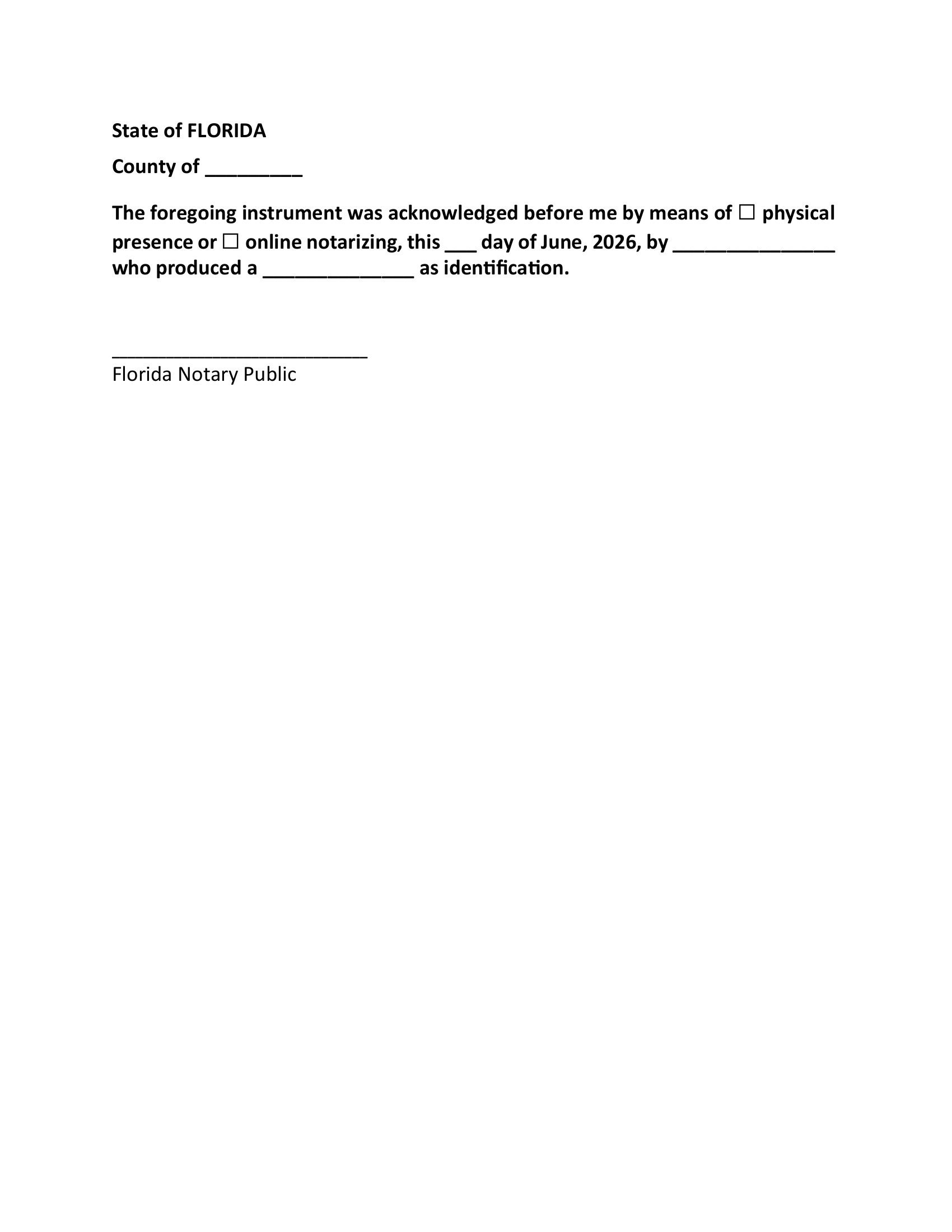
Download the Notary Statement Sample (PDF)
Here is exactly what must appear in your notarization:
Elements From the Notarial Statement
- State of Florida — The notarial statement must clearly identify the state as Florida.
- County — The specific Florida county where the notarization took place must be written in. This establishes the legal jurisdiction.
- Acknowledgment Language — The statement must include “the foregoing instrument was acknowledged before me” or the appropriate jurat language.
- Method of Appearance — The statement must indicate whether the signer appeared by Physical Presence or through Online Notarization. One box must be checked in this example. It’s also acceptable if Physically Present or Online Notarization is written.
- Date of Notarization — The specific day, month, and year when the notarization was performed.
- Full Name of the Signer — The full legal name of the person whose document is being notarized.
- Type of Identification Produced — What form of ID the signer produced, such as a Driver License/State ID or Passport.
- Notary’s Original Signature — The notary must sign with their original wet-ink signature. For online notarizations, a digital signature is used.
Additional Required Elements the Notary Must Include
The Florida Notary’s Seal or Stamp must have the Notary’s Full Name, State of Florida Notary Public, Commission #, and Expiration date on their notary stamp. The notary’s official seal or rubber stamp must be affixed to the document along with the Signature. The notary stamp must be clearly visible and not smudged.
Important: Florida Notary Requirements for Apostille Processing
If any one of these 13 required elements is missing from the notarization, the Florida Department of State will reject your document for apostille processing.
If your document is rejected, it must be returned to you, notarized again correctly, and then resubmitted for apostille. This can result in unnecessary delays, additional shipping costs, and the inconvenience of scheduling a second notarization.
Please note that Online Florida Apostille LLC will charge additional shipping fees if a rejected document must be returned and resubmitted.
Before Your Notary Appointment
We strongly recommend downloading our sample Florida notary certificate and providing it to your notary before your appointment. This sample helps ensure the notarization meets Florida Department of State requirements for apostille processing.
If your notary uses a different notarial certificate format, that is perfectly acceptable, provided all 13 required elements are included, along with the notary’s Florida seal and signature.
Verify Before You Leave
Before leaving your appointment, carefully review the notarization. If any required element is missing, ask the notary to correct it immediately. It is far easier to make corrections during the appointment than to deal with a rejection later.
Common Problem
Unfortunately, approximately 75% of the notarizations we review contain one or more errors that would cause the Florida Department of State to reject the document for apostille processing.
Taking a few extra minutes to verify the notarization now can save days of delay and additional expenses later.
The Florida Department of State not only issues apostilles but also regulates Florida notaries. Because the state closely reviews notarizations for compliance with Florida law, even a small error can result in a rejection.
Vital Statistics Documents: Check Who Signed It
If you are submitting a Florida birth certificate, death certificate, or other vital record for apostille, check who signed the certified copy before submitting it.
The Florida Department of State’s list of accepted documents asks for a birth or death certificate signed by the State Registrar — from the Florida Bureau of Vital Statistics or from a county health department — and says it confirms that the Registrar’s signature was valid when the certificate was issued. A marriage certificate can come from the Bureau of Vital Statistics (signed by the State Registrar) or as a certified copy from the county Clerk of Court. The State Registrar on certificates issued today is Ken Jones. Source: Florida Department of State, Accepted Documents (dos.fl.gov), checked 3 October 2026.
What This Means for You
In our own filings in Tallahassee, certificates signed by Ken Jones go through without trouble, but we have had older certificates signed by a former State Registrar refused. A birth or death certificate that is not signed by the State Registrar does not meet the State’s published requirement. Clerk-certified marriage certificates are different: they carry the Clerk’s certification and go through at the $20 state fee (Bureau of Vital Statistics copies are $10).
How to Get a Correctly Signed Document
Order a certified copy from the Florida Bureau of Vital Statistics in Jacksonville (or through VitalChek, its contracted vendor), or from your county health department. For a marriage certificate, the Clerk of Court in the county that issued the license is also an option.
When you receive the document, check the signature line. If it shows Ken Jones as State Registrar, it is ready to send to us or to submit to the Florida Department of State on your own.
If your copy was signed by a former State Registrar, the safest course is to order a new certified copy — or send us a photo first and we’ll tell you what we recommend.
Do Not Submit Documents That Are Not Correct
We understand the urgency. Many of our clients have overseas deadlines for employment, marriage, education, immigration, or legal proceedings. That urgency can make it tempting to submit a document quickly and hope for the best.
Please do not do this.
When the Florida Department of State rejects a document, the rejection adds a minimum of 4 to 6 additional weeks to your total processing time. Your original documents must be mailed back to you, you must obtain a corrected document or a new notarization, and then the entire submission process starts over from the beginning.
Sending a document with an incomplete notarization or a vital record signed by the wrong person does not save time. It guarantees a delay.
Before you submit any document for a Florida apostille, ask yourself two questions:
- Does my notarization include all thirteen required elements listed on this page?
- If this is a vital record (birth certificate, death certificate), is it signed by Ken Jones?
If the answer to either question is “no,” do not submit the document. Fix the issue first, then submit.
Let Us Review Your Document — Free, Before You Submit
Online Florida Apostille offers a free pre-submission document review for every client. Before you send us your document — or before you submit it on your own — call us. We will review your document over the phone or by email and tell you in less than five minutes whether it meets the Florida Department of State’s requirements. If you are filing yourself, our guide to how to complete the request form covers exactly what the state asks for.
This free review can save you weeks of delays and hundreds of dollars in re-notarization fees.
Call: (954) 999-4933
Hours: Monday through Saturday, 7:00 AM to 5:00 PM Eastern
Do not send a document you are unsure about. Call us first.